
Modern Pool Heating · Owner/operator Henry Manna, Florida Certified Pool/Spa Contractor CPC1460367
Updated October 16, 2026
Short answer
In our heater comparison, four heater lines have Wi-Fi and a phone app built in: Raypak's AVIA gas heaters and Crosswind V heat pump (Raymote), AquaCal's HeatWave SuperQuiet heat pumps (PoolSync) and Moov's Inverter heat pumps. Hayward and Jandy heaters reach your phone through their own automation systems, while GulfStream, Built Right and Thermeau publish no app at all. On a heat pump, Wi-Fi is worth having mainly for monitoring and fault diagnosis rather than remote start, because a heat pump holds a temperature rather than heating on demand; if you already own pool automation, matching the heater to it matters more than the heater's own Wi-Fi.
What we usually recommend
If you already have Pentair, Hayward or Jandy automation, we would usually choose a heater that joins that system properly, by a data link where one exists, and not pay for the heater's own Wi-Fi. If you have no automation and want to see and adjust the heater from your phone, AquaCal, Raypak and Moov build it in. If you leave a heat pump on its thermostat all season and rarely touch it, Wi-Fi is a convenience, not a reason to choose one heater over another.
- Built-in Wi-Fi with a direct app: Raypak AVIA and Crosswind V, AquaCal HeatWave SuperQuiet, Moov Inverter.
- App through the brand's automation: Hayward gas heaters (Omni) and Jandy heaters and heat pumps (AquaLink and iAquaLink).
- Data link (RS-485) into automation: Pentair MasterTemp to IntelliCenter, Pentair UltraTemp to IntelliTouch or EasyTouch, Jandy JXi and VersaTemp to AquaLink.
- Relay (dry contact) only: GulfStream HE Series, Hayward HeatPro, Built Right XW, Pentair ETi 400.
Three ways a heater gets onto your phone
There are really only three arrangements, and it helps to know which one you are being sold. The first is Wi-Fi built into the heater with the manufacturer's own app: the heater joins your home network and you control it directly. The second is app control through an automation system: the heater has no Wi-Fi of its own, but it connects to the brand's pool automation panel, and the automation's app controls it. The third is no app at all: the heater has a good control panel on the cabinet and terminals for a remote or an automation relay, and that is it.
Inside the second and third arrangements there is another distinction that matters more than Wi-Fi: how the heater talks to the automation. A data link, usually RS-485, is a two-way digital connection; the automation can send setpoints and modes and read the heater's status and faults. A relay, or dry contact, is a switch; the automation closes a contact to tell the heater to run, and that is about all it can say. The table in the next section lists what each manufacturer documents.
Which heaters have Wi-Fi, app control or automation, model by model
Every entry below comes from the manufacturer documents behind our heater comparison. Where a manufacturer does not document a capability, we list it as not published rather than assuming it.
A few notes on reading it. Hayward also sells its gas heaters with embedded OmniX smart control under HS-prefixed model numbers (HS250FDN, HS400FDN and so on); those are not the SKUs in our heater comparison. Raypak's AVIA reserves its RS-485 port for Raypak's own pumps and its Attendant controller, so third-party automation still connects by dry contact. And Jandy's JXiQ adds Bluetooth diagnostics in the Fluidra Pro app, which is a technician's tool rather than homeowner control.
| Model / line | Type | Wi-Fi | Phone app | Automation connection |
|---|---|---|---|---|
| Raypak AVIA 264A / 404A / HD NiTek | Gas | Built in (Raymote) | Direct | Relay: two- or three-wire dry contact for third-party automation |
| Raypak Crosswind V | Heat pump | Built in (Raymote) | Direct | Not recorded; the control itself can run a variable-speed pump, valve actuators and up to six devices |
| AquaCal HeatWave SuperQuiet | Heat pump | Built in (PoolSync) | Direct | Relay: external controller for heating and cooling mode; optional PoolSync Relay Center |
| Moov Inverter | Heat pump | Built in | Direct (Moov Pool app) | None published |
| Hayward Universal H-Series (H250 / H400) | Gas | None on these SKUs | Through a Hayward Omni system | Relay: two- and three-wire remote terminals |
| Hayward HeatPro HP21405T / HP31405T | Heat pump | None | Through a Hayward Omni system | Relay: J7 for heating, J28 for cooling |
| Jandy JXi / JXiQ / JXi with VersaFlo | Gas | None | Through AquaLink (iAquaLink app) | Data link: RS-485 to Jandy AquaLink |
| Jandy VersaTemp JRT3000R / JRT4001R | Heat pump | None | Through AquaLink (iAquaLink app) | Data link: RS-485 to Jandy AquaLink RS |
| Pentair MasterTemp (copper and HD) | Gas | None published | Not recorded | Data link: RS-485 COM port to IntelliCenter; fireman's switch for IntelliTouch, EasyTouch, IntelliConnect |
| Pentair ETi 400 | Gas | None published | Not recorded | Relay: 2-wire dry contact; no RS-485 documented |
| Pentair UltraTemp 140 H/C | Heat pump | None published | Not recorded | Data link: RS-485 to IntelliTouch or EasyTouch (software 1.11+); relay for all other systems |
| GulfStream HE Series | Heat pump | None | None published | Relay: dry-contact remote thermostat; manual states no RS-485 |
| Built Right XW Series | Heat pump | None | None published | Relay: two-wire remote for pool/spa remote or remote thermostat |
| Thermeau Signature / Prestige | Heat pump | None published | None published | None published |
Relay vs data link: what the automation can actually do
The difference shows up in daily use. Pentair's MasterTemp on an IntelliCenter is the clearest data-link example: the heater connects through its RS-485 COM port, its own buttons go inactive, and its alarms appear on the IntelliCenter home screen rather than blinking on a cabinet nobody looks at. Pentair's UltraTemp manual describes RS-485 control with IntelliTouch and EasyTouch on software version 1.11 or higher, where the automation overrides the heat pump's own setpoint. Jandy's VersaTemp on an AquaLink RS can be switched between heating and chilling and run a sampling mode that Jandy calls Auto-Heat on its sell sheet and Maintain Heat in the manual.
A relay connection is simpler and more limited. GulfStream's manual says the heat pump cannot be connected to automation over RS-485; instead you wire the automation's dry contacts to its remote thermostat terminals and enable remote mode, after which the automation's own temperature setting decides when the heat pump runs. Remote chilling on a GulfStream TA model needs a second spare dry-contact relay in the controller, and the manual warns that any relay that sends voltage will damage the heat pump's transformer. Hayward's HeatPro takes a two-wire relay on terminal J7 (and J28 for cooling on the HP31405T) in a bypass mode where it responds only to the remote relay. Pentair's own manual sends every automation package other than IntelliTouch and EasyTouch, including IntelliConnect, to the UltraTemp's dry-contact terminals, which switch the unit on and off but do not transfer setpoints.
Neither approach is wrong. A relay is robust and works with almost any controller; a data link gives you the heater's faults and settings in one place. What matters is knowing which one you are getting before the heater is chosen, especially if you already own an automation system.
Is Wi-Fi worthwhile on a pool heat pump?
It depends on how you use the pool. Heat pumps warm a swimming pool gradually over many hours. Actual heating speed depends on pool volume, heater output, starting water temperature, outdoor air temperature, humidity, wind conditions and whether the pool is covered. That changes what Wi-Fi is good for. Switching a heat pump on from your phone an hour before a swim does not do much; a gas heater is the tool for heating on short notice.
Where Wi-Fi earns its place on a heat pump is visibility. AquaCal describes PoolSync as giving app control of heating, cooling and autotemp modes plus remote diagnostics and performance monitoring, with the antenna built into the unit. Raypak describes Raymote as free app control with a fleet-monitoring dashboard for service companies. Being able to see that the unit has stopped with a flow fault, or that the water has not moved in two days, before you walk out to a cold pool, is genuinely useful, and remote diagnostics can shorten a service call.
The case against is just as practical. The heater needs a Wi-Fi signal that reaches the equipment pad. It is one more app, separate from your automation app if you have one. AquaCal's PoolSync, for example, is its own ecosystem rather than a native device inside a Pentair, Hayward or Jandy system. And you can manage a schedule without Wi-Fi: GulfStream's manual suggests using the spa thermostat as a second pool setting, lower during the week and warmer for weekends. If the pool is heated on its thermostat all season, the cabinet controls do most of what an app would.
Best pool heater with Wi-Fi: how we would choose
There is no single best answer, because Wi-Fi is one feature among many and rarely the one that should decide. For gas, the Raypak AVIA is the line in our heater comparison with Wi-Fi built into the heater itself; Hayward's HS-prefixed OmniX models (not the SKUs in our heater comparison) embed Hayward's smart control in the heater, and Jandy's heaters route control through iAquaLink automation instead. For heat pumps, three lines build it in: AquaCal's HeatWave SuperQuiet (heat and cool, built in St. Petersburg), Raypak's Crosswind V (heat and chill, with a control that can also run a variable-speed pump and valve actuators), and Moov's Inverter line (a modulating inverter, from a brand with a smaller Florida service base).
Before Wi-Fi tips the decision, check the things that matter more: warranty terms, capacity at 50°F air, the electrical circuit, and who will service the unit locally. Our controls score is only 10% of the MPH Equipment Score for exactly that reason; the How we rate page explains the weighting. A heater with a great app and a weak warranty is still a weak buy, and a heat pump with no app at all can be the right choice for a pool that runs on its thermostat.
Questions to ask before you connect a heater to automation
If your pad already has an automation panel, these are the questions we work through before recommending a heater. Most of them are answered in the heater's installation manual, and the answers decide whether the heater becomes part of your system or just something your system switches on.
If any answer is unclear on a quote, ask the installer to show you the page in the manual. A heater that has to be wired in a way the manual does not describe is a warranty conversation waiting to happen.
- Which controller do you have, and on what software version? Pentair's UltraTemp needs IntelliTouch or EasyTouch on software 1.11 or later for RS-485; Jandy's JRT4001R needs heat pump interface software 3.0 or later and AquaLink RS revision N or later.
- Does the heater join by data link or relay with your controller specifically, not just with the brand in general?
- Will the heater's faults appear on the automation screen and app, or only on the heater's cabinet?
- On a heat-and-cool unit, does remote cooling need a second relay, and does your controller have a spare dry-contact relay for it? GulfStream's TA models do need one.
- Is every relay going to the heater a dry contact? GulfStream warns that a relay that sends voltage will damage its transformer.
- Who sets the pump speed while the heater runs, the automation or the heater? AquaCal and Raypak both describe controls that can program variable-speed pumps.
- If you have both a heat pump and a gas heater, how will the automation decide which one runs?
What this looks like on a real equipment pad
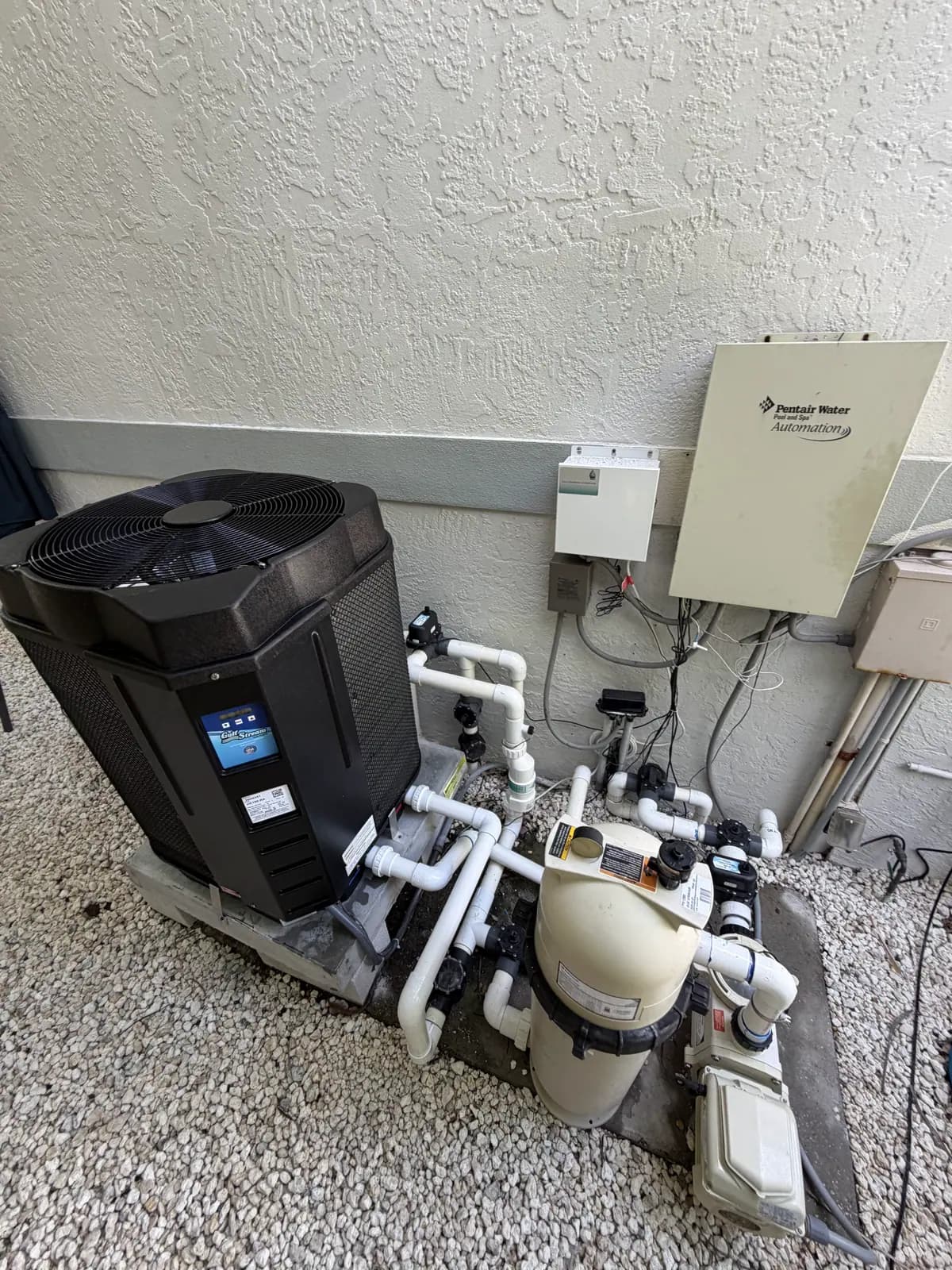
One of our Siesta Key installs is a good example of the most common Florida situation. A heat-only GulfStream HE150-RA sits on a barrier-island pad that also carries a Pentair automation panel, a cartridge filter and a pump. The HE150-RA connects to automation through dry-contact remote thermostat terminals, not a Pentair data connection, so on a pad like that, wherever the heat pump is wired to the automation, it is switched by it rather than appearing in it as a networked device. The plumbing also has to thread between the automation panel, filter and pump, which is part of planning any shared pad.
Whatever the controls, ask your installer to walk you through the heater before they leave: setting the temperature, what the display is telling you, and what to do if it shows a fault. Our Sarasota Hayward heat pump job includes a photo of exactly that conversation. A heater you understand at the cabinet is worth more than an app you never open.
Pros and cons
Heater with Wi-Fi built in (Raypak, AquaCal, Moov)
Pros
- Phone control and monitoring with no automation panel to buy.
- Remote diagnostics on AquaCal and fleet monitoring for service companies on Raypak.
- Simple for a pad that has no automation.
Cons
- Needs a Wi-Fi signal at the equipment pad.
- A separate app from any automation you already own.
- The manufacturer's own ecosystem rather than a native device in Pentair, Hayward or Jandy automation.
Heater on a data link to automation (Pentair MasterTemp, UltraTemp; Jandy JXi, VersaTemp)
Pros
- Setpoints, modes and faults in one automation app and screen.
- Heater faults show on the automation rather than only at the cabinet.
- Heat-and-chill switching from automation on Jandy VersaTemp.
Cons
- Works only with the matching brand's controller, and sometimes only on certain software versions.
- Requires owning, or buying, that automation system.
Relay-only heater (GulfStream, Hayward HeatPro, Built Right, Pentair ETi)
Pros
- Works with almost any automation controller through a dry contact.
- Nothing extra to configure or keep connected.
- Good cabinet controls; GulfStream reports faults in plain language.
Cons
- No phone app on its own.
- Automation can switch it but cannot read its faults or set its modes digitally.
- Remote cooling on a GulfStream TA needs a second spare relay.
Real installations
Recent jobs from our installation library that relate to this topic.